When Your Heater Thermostat Not Working Leaves You Freezing
A heater thermostat not working is one of the most common — and frustrating — winter problems Rhode Island homeowners face. The good news? Many causes have simple fixes you can handle yourself.
Quick answer — most common reasons your heater thermostat isn’t working:
- Wrong settings — thermostat not set to “Heat” mode, or temperature set too low
- Dead batteries — the single most common cause; replace with fresh AA or AAA batteries
- Tripped circuit breaker — check your electrical panel and reset the HVAC breaker
- Clogged air filter — a dirty filter triggers a safety shutdown that looks like a thermostat failure
- Furnace power switch is off — a simple switch near your furnace, often mistaken for a light switch
- Wiring issues — loose or corroded wires prevent communication between thermostat and furnace
- Faulty thermostat — units older than 10 years may simply need replacement
Your thermostat is the control hub of your entire heating system. When it stops communicating with your furnace or boiler, your home gets cold fast — even if the thermostat display looks perfectly normal.
I’m Richard Marcello, President of Advanced Heating & Cooling, and over my 30+ years in the HVAC industry I’ve diagnosed hundreds of heater thermostat not working situations — from a simple dead battery to a failed furnace control board. Most problems follow a predictable pattern, and this guide will walk you through all of them.
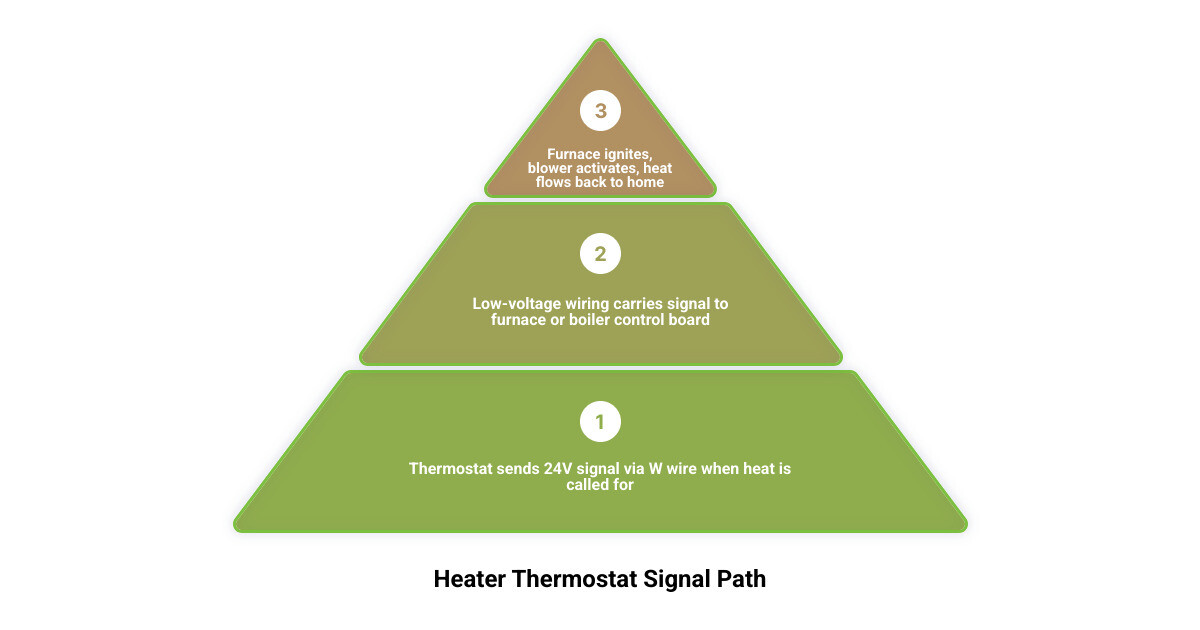
Heater thermostat not working definitions:
Troubleshooting a Heater Thermostat Not Working: The Essential Guide
When you realize your home is getting chilly, the first place you look is that little box on the wall. If your heater thermostat not working is the culprit, you need a systematic approach to find the fix. It’s easy to panic and assume your entire furnace is dead, but more often than not, the “brain” of the system just needs a little attention.

Common Settings for a Heater Thermostat Not Working
It might sound too simple to be true, but we receive many calls in Smithfield and Johnston where the fix is just a button press away. Before you pull out the toolbox, verify these settings:
- Heat Mode: Ensure the selector switch is actually on “Heat.” During those weird Rhode Island autumns where we use the AC one day and the heater the next, it’s easy to leave it on “Cool” or “Off.”
- Temperature Threshold: Set the thermostat at least 5 degrees higher than the current room temperature. If the room is 68°F and your thermostat is set to 68°F, the heat won’t kick on.
- Fan Settings: Keep the fan set to “Auto.” If it’s set to “On,” the fan will blow air constantly even when the furnace isn’t heating, which can make the house feel drafty and cold.
- Hold and Vacation Modes: Check if a “Hold” or “Vacation” setting is overriding your normal schedule. Sometimes a power flicker can cause a programmable thermostat to get stuck in a mode you didn’t intend.
- Schedule Overrides: Modern thermostats can be finicky. Ensure the current time and day are correct so the programmed schedule isn’t keeping the house at a “sleep” temperature during the day.
If these basics are correct, you can dive deeper into 7 Common Reasons Your Thermostat Isn’t Working to narrow down the issue. If you’ve checked the settings and still have no luck, it might be time for more info about heating repair services.
Battery Replacement and Power Checks
If your thermostat screen is blank or flickering, the power source is the prime suspect. Most digital thermostats rely on batteries (usually AA or AAA) for backup or primary power.
- Annual Replacement: We recommend replacing batteries every year, perhaps at the same time you check your smoke detectors.
- Low Battery Icons: Don’t ignore that tiny battery symbol. Even if the display is still visible, weak batteries might not have enough “juice” to trigger the relay that starts your furnace.
- Corrosion: If batteries have been sitting too long, they can leak. Use a cotton swab with a tiny bit of vinegar to clean any white, crusty corrosion off the metal terminals.
Table: Battery-Powered vs. Hardwired Thermostat Symptoms
| Symptom | Battery-Powered | Hardwired (C-Wire) |
|---|---|---|
| Blank Screen | Likely dead batteries | Tripped breaker or blown furnace fuse |
| Loses Settings | Batteries are critically low | Internal capacitor failure or power surge |
| Won’t Click | Insufficient voltage to move relay | Communication error with furnace |
| Random Reboots | Loose battery contact | Insufficient power from transformer |
Power and Electrical Failures
If the batteries are fresh but the screen remains dark, or the thermostat seems “dead,” the problem likely lies in your home’s electrical system. Your HVAC system is a complex circuit, and a break anywhere in that line will result in a heater thermostat not working.

Circuit Breakers and Power Switches
Check your main electrical panel. Look for a breaker labeled “Furnace,” “Boiler,” or “HVAC.” Sometimes a power surge can trip the breaker without you noticing. Flip it all the way to “Off” and then back to “On.”
Additionally, most furnaces in North Smithfield and Greenville have a service switch nearby. It looks exactly like a standard light switch and is often located on the side of the furnace or on a nearby wall. It’s remarkably common for someone to accidentally flip this switch off while reaching for a light or moving boxes in the basement.
Blown Transformer Fuses
Your thermostat operates on 24V low-voltage power, which is converted from your home’s 120V power by a transformer inside the furnace. If there is a short circuit in the wiring, a small automotive-style fuse on the furnace’s control board might blow. If you’re comfortable opening the furnace cabinet, you can check this fuse, but this is often where we suggest calling in a pro. According to Thermostat Not Turning Heat On? Here’s Why – Lennox, power issues are a leading cause of system failure.
Identifying Wiring Issues When Your Heater Thermostat Not Working
Wiring is the “nervous system” of your HVAC. Over time, wires can vibrate loose, or rodents in the attic might chew through them.
- C-Wire Requirements: Many modern smart thermostats require a “C-wire” (common wire) for constant power. If you recently installed a new unit and it’s acting up, it might be starving for power.
- Loose Terminals: With the power off at the breaker, you can pop the thermostat off its wall plate. Ensure each colored wire is firmly tucked into its corresponding terminal (R, W, G, etc.).
- The R and W Bypass Test: This is a classic diagnostic trick. If you take the “R” (power) and “W” (heat) wires and carefully touch them together (bypassing the thermostat), and the furnace kicks on, you know the thermostat itself is broken. If the furnace doesn’t kick on, the problem is in the furnace or the wiring.
Understanding the importance of regular HVAC maintenance can help prevent these wiring headaches before the snow starts falling.
Airflow and System Safety Lockouts
Sometimes, a heater thermostat not working is actually a symptom of a safety feature doing its job. Modern heating systems are designed to shut down if they become dangerously hot.
The Dirty Filter Culprit
A clogged air filter is the number one cause of “mysterious” heating failures. When a filter is caked in dust, the furnace can’t “breathe.” This causes the heat exchanger to overheat, which triggers the high-limit switch. This switch kills the power to the heating cycle to prevent a fire or a cracked heat exchanger.
The Department of Energy notes that replacing a dirty filter can lower energy use by 5–15%. More importantly for your comfort, it keeps the system from entering a “lockout” mode. If your thermostat says “Heat On” but the furnace stays silent, check your filter immediately. To dive deeper into local maintenance needs, learn more about Smithfield RI heating repair.
Why the Thermostat Clicks but No Heat Starts
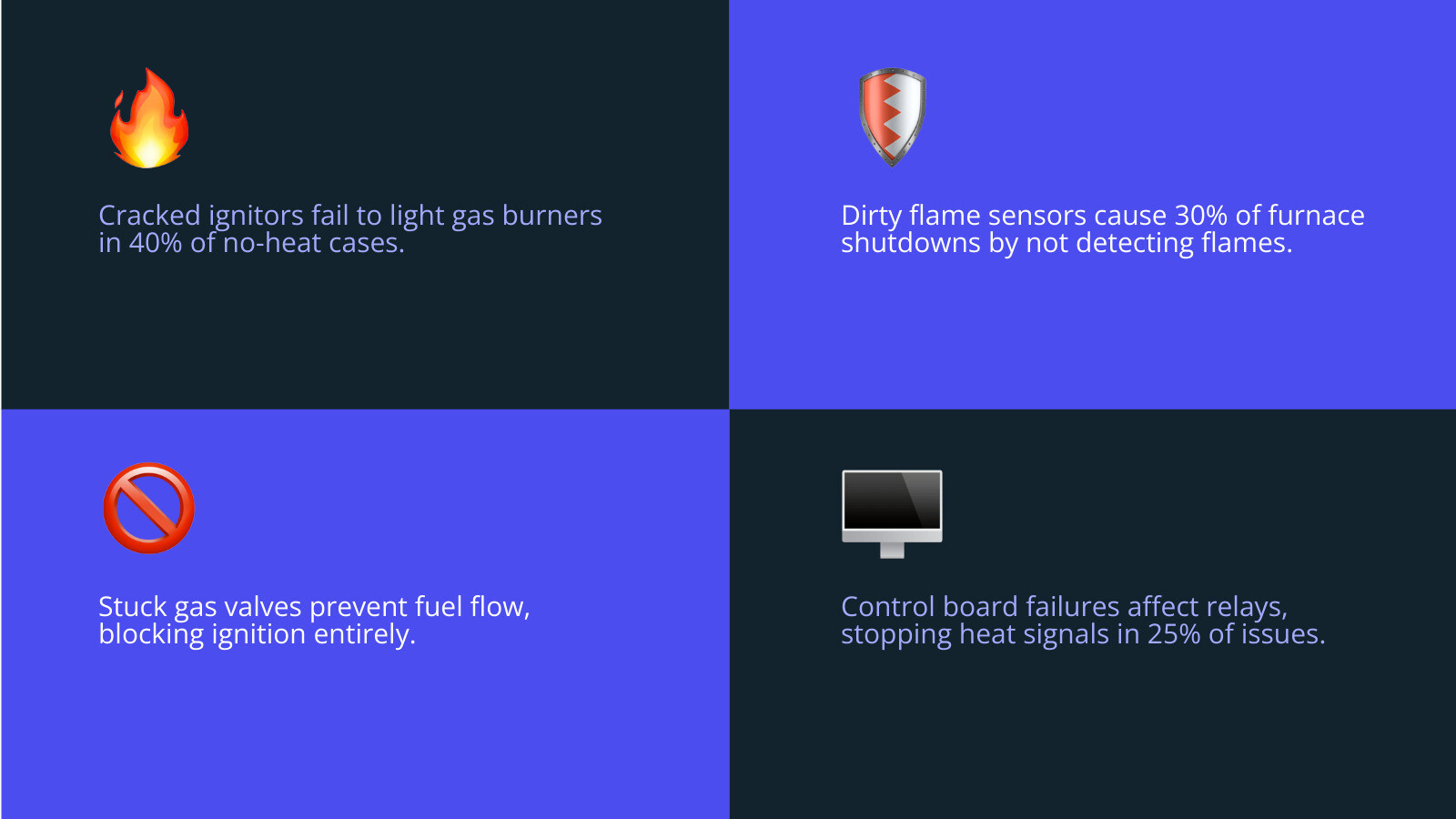
If you hear a distinct click from the thermostat, it means the “brain” has sent the signal. If nothing happens after that, the issue is “downstream” at the furnace or boiler. Common culprits include:
- Faulty Ignitor: The component that actually lights the gas. If it’s cracked or worn out, the furnace won’t fire up.
- Dirty Flame Sensor: A safety rod that detects if a flame is present. If it’s covered in soot, it won’t “see” the flame and will shut the gas off for safety.
- Gas Valve Issues: If the valve doesn’t open, no fuel reaches the burners.
- Control Board Failure: The “motherboard” of your furnace may have a failed relay or circuit.
Optimizing Thermostat Placement and Maintenance
Where you put your thermostat is just as important as what kind you buy. If your thermostat is in a bad spot, it will give “ghost readings,” causing your home to be too hot or too cold.
The Ideal Location
A thermostat should be installed:
- On an interior wall to avoid the temperature swings of outside air.
- About 5 feet above the floor where the air temperature is most representative of the room.
- Away from direct sunlight, which can trick the sensor into thinking the house is warmer than it is.
- Away from drafts (doors, windows) or heat sources like ovens and lamps.
Cleaning and Recalibration Steps
Dust is the enemy of electronics. Over time, dust can coat the internal sensors of your thermostat, leading to inaccurate readings.
- Dust Removal: Pop the cover off and use a can of compressed air to gently blow away debris.
- Soft Brush: Use a very soft artist’s brush to clean between the contact points.
- Mercury Bulb Leveling: If you have an older “round” thermostat with a glass bulb inside, it must be perfectly level to work. If it’s tilted, the mercury won’t tip the switch at the right temperature.
- Factory Reset: If your smart thermostat is acting “glitchy,” a factory reset (found in the settings menu) can often clear out software bugs.
As thermostats have a typical lifespan of about 10 years, you might wonder: Are smart thermostats really worth it? In our experience in the Smithfield area, the energy savings and remote diagnostic features make them a great investment for 2026.
Frequently Asked Questions about Thermostat Failures
Why does my thermostat say ‘Heat On’ but the air is cold?
This usually indicates the thermostat is working, but the furnace has encountered a problem. It could be a safety lockout due to a dirty filter, a pilot light that has gone out (on older units), or a gas supply issue. If you have a heat pump, it could also be that the outdoor unit is iced over and needs to enter a defrost cycle.
How do I know if the problem is my thermostat or my furnace?
The easiest way is the “bypass test” mentioned earlier. If you jump the R and W wires and the furnace starts, your thermostat is the problem. Also, consider the age of your equipment. Thermostats usually last about 10 years, while heaters have a lifespan of 15 to 20 years. If both are old, they may be failing together.
When should I call an HVAC professional?
While DIY troubleshooting is great, safety should always come first. Call us immediately if you:
- Smell gas (a “rotten egg” odor).
- Hear loud banging, screeching, or whistling noises.
- Notice the circuit breaker trips repeatedly after you reset it.
- See frayed or burnt wiring.
- Have a boiler that is leaking water from the T&P valve.
Conclusion
A heater thermostat not working doesn’t have to mean a weekend of shivering under blankets. By checking your settings, replacing batteries, and ensuring your air filters are clean, you can solve many common heating issues on your own. However, when the problem involves gas valves, complex electrical circuits, or internal furnace components, it’s best to rely on the experts.
At Advanced Heating & Cooling, we’ve been serving our neighbors in Smithfield, North Smithfield, Johnston, and the surrounding areas for over 30 years. We pride ourselves on honest, quality workmanship and are always here to provide a free estimate for your heating needs. Don’t let a finicky thermostat ruin your winter comfort.
Schedule your heating installation or repair today and let us get your home back to being warm and cozy!